Valerion Projectors with Bluetooth
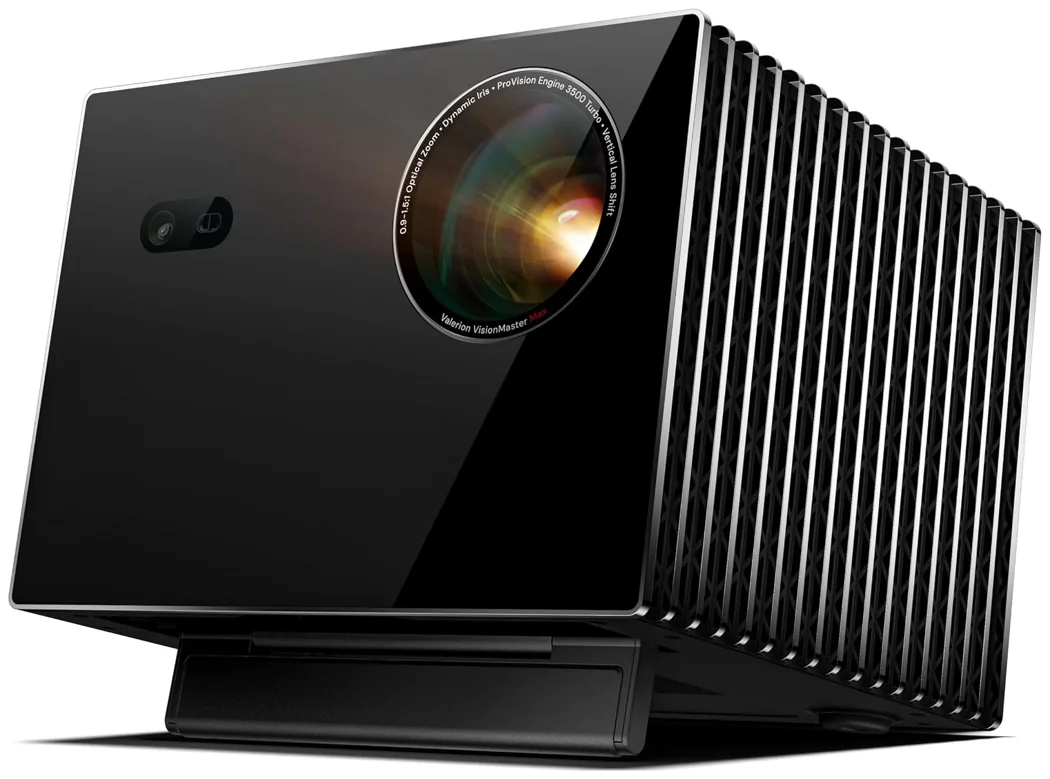
Valerion's VisionMaster Max is a 4K laser projector for a room where screen size and lens position deserve some planning. Its optical zoom adjusts the image size within the available throw range, and vertical lens shift lets you adjust image height. That gives you room to fine-tune a shelf or ceiling installation. For sound, the Max can pair with Bluetooth headphones or a speaker. Start by measuring the usable wall width and your lens-to-screen distance, then check how the chosen speaker or headphones fit into the setup.
Valerion projector questions
Can a VisionMaster Max pair with Bluetooth headphones?
Yes. Valerion lists Bluetooth 5.2 and support for headphones and speakers on the Max. Put the headphones into pairing mode, then use the projector's remote and accessory settings to add them. Once paired, check the volume on both devices before starting your film.
How do I work out where to place a VisionMaster Max?
Use Valerion's throw distance calculator with the Max and your intended screen size. Measure from the lens to the screen surface when checking the result. Leave room behind the projector for cables and confirm that the support or mounting point sits within the recommended distance.
Does the VisionMaster Max have lens shift?
Yes. Valerion specifies vertical lens shift on the Max. It lets you move the projected image up or down without relocating the whole projector. Plan the horizontal alignment separately, particularly if you intend to place the unit on an existing shelf.
Can I put the VisionMaster Max on a shelf to the side of my screen?
Plan for the lens to face the screen near its horizontal center. Valerion documents vertical lens shift for the Max and says horizontal lens shift is unavailable. Check the proposed shelf position before installation, because vertical adjustment cannot correct a large sideways offset.
How does optical zoom help with a Valerion installation?
On the Max, optical zoom lets you adjust the size of the projected image within the supported distance range. The first step is still choosing a screen size and a compatible lens position. Lens shift then lets you fine-tune the height without moving the shelf.
 Valerion